> ## Documentation Index
> Fetch the complete documentation index at: https://phalanetwork.mintlify.site/llms.txt
> Use this file to discover all available pages before exploring further.

# Component Summary

> dstack is an open-source platform that transforms any Docker container into a secure Trusted Execution Environment (TEE) deployment with zero code changes. This overview introduces the fundamental concepts and guides you to the detailed documentation you need.

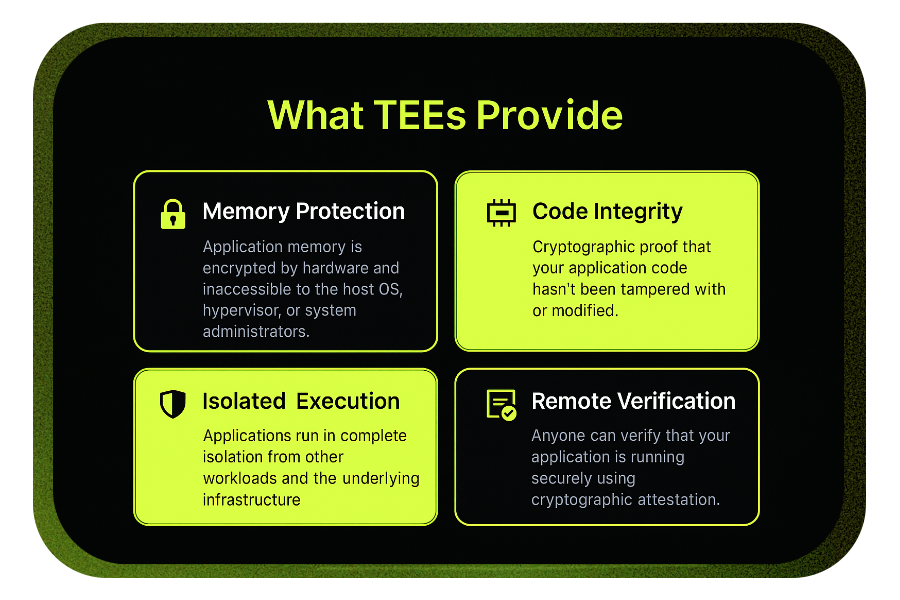
<img src="https://mintcdn.com/phalanetwork/EDH2CSxg-w7_HARR/docs/images/what-tee-provide-pro.png?fit=max&auto=format&n=EDH2CSxg-w7_HARR&q=85&s=654d80fbe37a5c713940efd3f83ea99b" width="900" height="600" data-path="docs/images/what-tee-provide-pro.png" />

## Understanding TEEs and Confidential Computing

At its core, dstack leverages **Trusted Execution Environments** - hardware-secured computing environments that protect your code and data even from privileged system access. Think of a TEE as a hardware-enforced safe room for your applications.

**Current TEE Support:** dstack currently supports [Intel TDX (Trust Domain Extensions)](https://www.intel.com/content/www/us/en/developer/tools/trust-domain-extensions/overview.html) with planned support for AMD SEV-SNP and ARM Confidential Compute Architecture.

***

## DStack main components

dstack's architecture centers around five primary components that work together to provide secure deployment:
<div className="bg-gray-50 p-6 rounded-lg my-4">
  <table className="w-full">
    <thead>
      <tr className="border-b">
        <th className="text-left p-2">Component</th>
        <th className="text-left p-2">Primary Role</th>
        <th className="text-left p-2">When You'll Use It</th>
      </tr>
    </thead>

    <tbody>
      <tr className="border-b">
        <td className="p-2 font-semibold">dstack-vmm</td>
        <td className="p-2">Manages TEE virtual machines</td>
        <td className="p-2">Every deployment</td>
      </tr>

      <tr className="border-b">
        <td className="p-2 font-semibold">dstack-gateway</td>
        <td className="p-2">Secure HTTPS gateway</td>
        <td className="p-2">Web-accessible applications</td>
      </tr>

      <tr className="border-b">
        <td className="p-2 font-semibold">dstack-kms</td>
        <td className="p-2">Cryptographic key management</td>
        <td className="p-2">Secure data handling</td>
      </tr>

      <tr className="border-b">
        <td className="p-2 font-semibold">dstack-guest-agent</td>
        <td className="p-2">Container management in TEE</td>
        <td className="p-2">Runtime operations</td>
      </tr>

      <tr>
        <td className="p-2 font-semibold">dstack-os</td>
        <td className="p-2">Minimal secure operating system</td>
        <td className="p-2">TEE environment foundation</td>
      </tr>
    </tbody>
  </table>
</div>

**Next:** Learn about each component's basic role in [Basic Components](/docs/concepts/basic-components)

***

# The DStack Approach

<p className="mb-2">
  dstack abstracts the complexity of TEE deployment through a familiar Docker-centric workflow:
</p>

<div className="flex flex-col md:flex-row items-center gap-6 my-6">
  <div className="flex-shrink-0">
    <img src="https://mintcdn.com/phalanetwork/EDH2CSxg-w7_HARR/docs/images/docker-logo.png?fit=max&auto=format&n=EDH2CSxg-w7_HARR&q=85&s=a587660d3147a76fb43d5ba9fb4c3544" alt="Docker Logo" className="w-24 h-24 md:w-32 md:h-32 rounded-lg shadow-md bg-white p-2" style={{ border: '2px solid #e5e7eb' }} width="900" height="700" data-path="docs/images/docker-logo.png" />
  </div>

  <div>
    <ol className="list-decimal list-inside space-y-1">
      <li><strong>Start with existing containers</strong> – Use your current Docker containers and compose files</li>
      <li><strong>Deploy to secure infrastructure</strong> – dstack handles TEE provisioning and configuration</li>
      <li><strong>Get automatic security</strong> – Memory encryption, attestation, and secure networking included</li>
      <li><strong>Verify independently</strong> – Cryptographic proof of security available to anyone</li>
    </ol>
  </div>
</div>

***

# Security Model

dstack implements a **zero-trust architecture** where security doesn't depend on trusting infrastructure providers, system administrators, or even the host operating system.

<div className="flex flex-col md:flex-row gap-6 my-6">
  <div className="flex-1 bg-lime-100 border-l-4 border-lime-400 rounded-lg p-5 shadow-sm">
    <h4 className="font-semibold text-lime-700 mb-4 flex items-center gap-2">
      <span className="text-2xl">✅</span> what we trust
    </h4>

    <div className="text-lime-800 text-sm space-y-1">
      <div className="print:block">- TEE hardware (cryptographically verified)</div>
      <div className="print:block">- Open-source code (auditable by anyone)</div>
      <div className="print:block">- Blockchain consensus (decentralized verification)</div>
      <div className="print:block">- Mathematical proofs (attestation signatures)</div>
    </div>
  </div>

  <div className="flex-1 bg-yellow-50 border-l-4 border-yellow-400 rounded-lg p-5 shadow-sm">
    <h4 className="font-semibold text-yellow-700 mb-4 flex items-center gap-2">
      <span className="text-2xl">⚠️</span> what we don't trust
    </h4>

    <div className="text-yellow-800 text-sm space-y-1">
      <div className="print:block">- Host operating systems</div>
      <div className="print:block">- Cloud providers</div>
      <div className="print:block">- Network infrastructure</div>
      <div className="print:block">- System administrators</div>
      <div className="print:block">- Other applications on the same hardware</div>
    </div>
  </div>
</div>

<div className="mt-2">
  see <a href="/docs/concepts/architecture" className="underline text-blue-700">system architecture</a> for more security details
</div>

## Key Active Technologies

dstack uses several advanced security mechanisms to guarantee the integrity, confidentiality, and portability of workloads across different environments:

**Remote Attestation**\
remote attestation is central to dstack's security model. It provides cryptographic proof that the Trusted Execution Environment (TEE) is genuine and that the application code hasn't been tampered with. This lets any party verify the integrity and authenticity of the TEE and the running code, ensuring the execution context matches expected measurements. This verifiable evidence is essential for building trust in distributed systems and is a core part of confidential computing.

**Decentralized Key Management**\
dstack uses decentralized methods to manage cryptographic keys, reducing reliance on any single provider or authority and improving resilience and security.

**Immutable Deployments**\
deployments in dstack are immutable, meaning application images and configurations can't be changed after deployment. This ensures consistency, prevents drift, and makes it easier to verify the integrity of running workloads.

<span className="text-green-700 font-semibold">
  for a comprehensive understanding of dstack's security framework, see the <a href="/docs/concepts/security-model" className="underline text-lime-600 font-semibold ml-1">Security Model</a> page. More technical details are available on the <a href="/docs/concepts/core-components" className="underline text-lime-600 font-semibold ml-1">Core Components</a> page.
</span>

# DStack Network Architecture

dstack secures data in transit through a multi-tiered network stack, integrating four distinct security and isolation domains:

**Public HTTPS**\
Every public endpoint is fronted by automatically issued and renewed TLS certificates from [Let's Encrypt](https://letsencrypt.org/), delivering browser-to-edge encryption and hands-free domain routing.

**WireGuard VPN**\
A lightweight mesh of [WireGuard](https://www.wireguard.com/) tunnels secures node-to-node traffic, creating a zero-trust backbone that spans clouds, regions, and on-prem clusters with minimal latency overhead.

**TDX Isolation**\
Workloads run inside Intel [Trust Domain Extensions (TDX)](https://en.wikipedia.org/wiki/Trust_Domain_Extensions) confidential VMs. Each trust domain is hardware-isolated from the host hypervisor and other tenants; network interfaces are scoped and attested before any packet is accepted, blocking spoofing and side-channel attacks.

**Application**\
Inside each TDX enclave, containers use standard Docker/Kubernetes networking—services, virtual IPs, and sidecars—so existing micro-services communicate normally while inheriting all lower-layer protections.

<span className="text-green-700 font-semibold">
  understanding dstack's secure networking architecture and traffic routing—<a href="/docs/concepts/networking" className="underline text-lime-600 font-semibold ml-1">see the networking guide</a>
</span>

## Documentation Navigation

**Core concepts reading path** – follow this sequence to build comprehensive understanding:

<div className="grid grid-cols-1 md:grid-cols-3 gap-4 mt-6">
  <a href="/docs/concepts/basic-components" className="bg-lime-200 border border-lime-300 rounded-lg p-5 hover:shadow-md transition-shadow group relative">
    <div className="absolute top-3 right-4 text-lime-500 text-lg font-bold select-none">①</div>
    <div className="text-3xl mb-3">🧩</div>
    <h3 className="font-semibold text-lime-800 mb-2 group-hover:text-lime-900">Basic Components</h3>
    <p className="text-sm text-lime-700 mb-2">Start here. Learn the role of each component and how they work together.</p>
    <div className="text-xs text-lime-600">💡 Focus on relationships, not implementation details</div>
  </a>

  <a href="/docs/concepts/core-components" className="bg-lime-100 border border-lime-200 rounded-lg p-5 hover:shadow-md transition-shadow group relative">
    <div className="absolute top-3 right-4 text-lime-400 text-lg font-bold select-none">②</div>
    <div className="text-3xl mb-3">⚙️</div>
    <h3 className="font-semibold text-lime-700 mb-2 group-hover:text-lime-800">Core Components</h3>
    <p className="text-sm text-lime-600 mb-2">Deep dive into configuration, APIs, and technical implementation patterns.</p>
    <div className="text-xs text-lime-500">💡 Reference material for deployment and troubleshooting</div>
  </a>

  <a href="/docs/concepts/networking" className="bg-lime-50 border border-lime-100 rounded-lg p-5 hover:shadow-md transition-shadow group relative">
    <div className="absolute top-3 right-4 text-lime-300 text-lg font-bold select-none">③</div>
    <div className="text-3xl mb-3">🌐</div>
    <h3 className="font-semibold text-lime-600 mb-2 group-hover:text-lime-700">Networking</h3>
    <p className="text-sm text-lime-500 mb-2">Understand secure traffic routing, VPN tunnels, and network isolation.</p>
    <div className="text-xs text-lime-400">💡 Critical for production deployments and security</div>
  </a>
</div>

<div className="grid grid-cols-1 md:grid-cols-2 gap-4 mt-6 justify-center items-center place-items-center">
  <a href="/docs/concepts/security-model" className="bg-lime-50 border border-lime-100 rounded-lg p-5 hover:shadow-md transition-shadow group relative w-full max-w-md">
    <div className="absolute top-3 right-4 text-lime-300 text-lg font-bold select-none">④</div>
    <div className="text-3xl mb-3">🔒</div>
    <h3 className="font-semibold text-lime-600 mb-2 group-hover:text-lime-700">Security Model</h3>
    <p className="text-sm text-lime-500 mb-2">TEE fundamentals, attestation, and the cryptographic foundations of trust.</p>
    <div className="text-xs text-lime-400">💡 Essential for understanding "why" behind design choices</div>
  </a>

  <a href="/docs/concepts/architecture" className="bg-lime-100 border border-lime-200 rounded-lg p-5 hover:shadow-md transition-shadow group relative w-full max-w-md">
    <div className="absolute top-3 right-4 text-lime-400 text-lg font-bold select-none">⑤</div>
    <div className="text-3xl mb-3">🏗️</div>
    <h3 className="font-semibold text-lime-700 mb-2 group-hover:text-lime-800">System Architecture</h3>
    <p className="text-sm text-lime-600 mb-2">Complete picture: how everything connects, scales, and operates together.</p>
    <div className="text-xs text-lime-500">💡 Big picture view after understanding individual pieces</div>
  </a>
</div>

## What if i read everything and want to go even deeper?

Before you jump into the advanced research and security topics, make sure you've gone through the next page on the basics of dstack's core components. understanding how the `/kms`, `/vmm`, and `/gateway` work together will give you much better intuition for the deeper material.

Once you're comfortable with those, then we recommend moving on to [security and research](/docs/security-research/overview) for a look at the underlying security research and design decisions.
