> ## Documentation Index
> Fetch the complete documentation index at: https://phalanetwork.mintlify.site/llms.txt
> Use this file to discover all available pages before exploring further.

# Step 7: Deploy Applications

> Deploy Applications

<div className="bg-white border border-gray-200 rounded-lg p-6 my-6">
  <h3 className="text-lg font-semibold mb-4">Deploy app on the dstack-vmm</h3>

  <p className="text-gray-600 mb-6">After the dstack-vmm is ready, you can deploy an app following these steps:</p>

  ### 1. On-chain Registration

  <div className="bg-gray-50 p-4 rounded-lg mb-4">
    <h4 className="font-medium mb-2">Registration Process</h4>

    <div className="grid grid-cols-1 md:grid-cols-2 gap-4">
      <div>
        <h5 className="font-medium text-sm mb-1">Step 1: Deploy AppAuth Contract</h5>
        <p className="text-xs text-gray-600">Deploy an App's control contract AppAuth. Use the reference contract or develop your own implementing the IAppAuth interface.</p>
      </div>

      <div>
        <h5 className="font-medium text-sm mb-1">Step 2: Register App</h5>
        <p className="text-xs text-gray-600">Call KmsAuth.registerApp(appAuthAddress) to register and obtain the App Id.</p>
      </div>
    </div>
  </div>

  ```bash theme={null}
  git clone https://github.com/Dstack-TEE/dstack
  cd dstack/kms/auth-eth
  npm install
  npx hardhat compile
  export PRIVATE_KEY=<your eth private key here>
  export KMS_CONTRACT_ADDRESS=0xFE6C45aE66344CAEF5E5D7e2cbD476286D651875
  npx hardhat app:deploy --allow-any-device --network phala
  ```

  <div className="bg-gray-100 p-3 rounded text-sm mt-2">
    <pre>
      Deploying proxy...
      Waiting for deployment...
      AppAuth Proxy deployed to: 0xD4a546B1C7e63CD4CeD314b2C90108e49191A915
      Implementation deployed to: 0x5aC1671E1Df54994D023F0B05806821d6D84e086
      Deployment completed successfully
      Transaction hash: 0xceac2ac6d56a40fef903b947d3a05df42ccce66da7f356c5d54afda68277f9a9
      Waiting for transaction 0xe144e9007208079e5e82c04f727d2383c58184e74d4f860e62557b5f330ab832 to be confirmed...
      App registered in KMS successfully
      Registered AppId: 0xA35b434eE853fdf9c2Bf48Fa1583Ac1332d50255
    </pre>
  </div>

  <div className="bg-blue-50 border-l-4 border-blue-400 p-4 mt-4">
    <p className="text-sm text-blue-700">
      <strong>Important:</strong> Note the AppId - you'll need this when deploying the CVM. If upgrading contracts in the future, backup the <code>.openzeppelin/unknown-2035.json</code> file.
    </p>
  </div>

  ### 2. Add App Compose Hash to Whitelist

  <div className="bg-gray-50 p-4 rounded-lg mb-4">
    <p className="text-sm text-gray-600">Build app-compose.json and calculate its sha256 to get compose-hash. The compose hash can also be previewed in the dstack-vmm UI.</p>
  </div>

  ```bash theme={null}
  export PRIVATE_KEY=<your eth private key here>
  export KMS_CONTRACT_ADDRESS=0xFE6C45aE66344CAEF5E5D7e2cbD476286D651875
  npx hardhat app:add-hash --network phala --app-id 0xA35b434eE853fdf9c2Bf48Fa1583Ac1332d50255 0x44d9cb98aaa6ab11f5729fc7d6fd58117585e0e3fbec621612dcee6b2dfbcde5
  ```

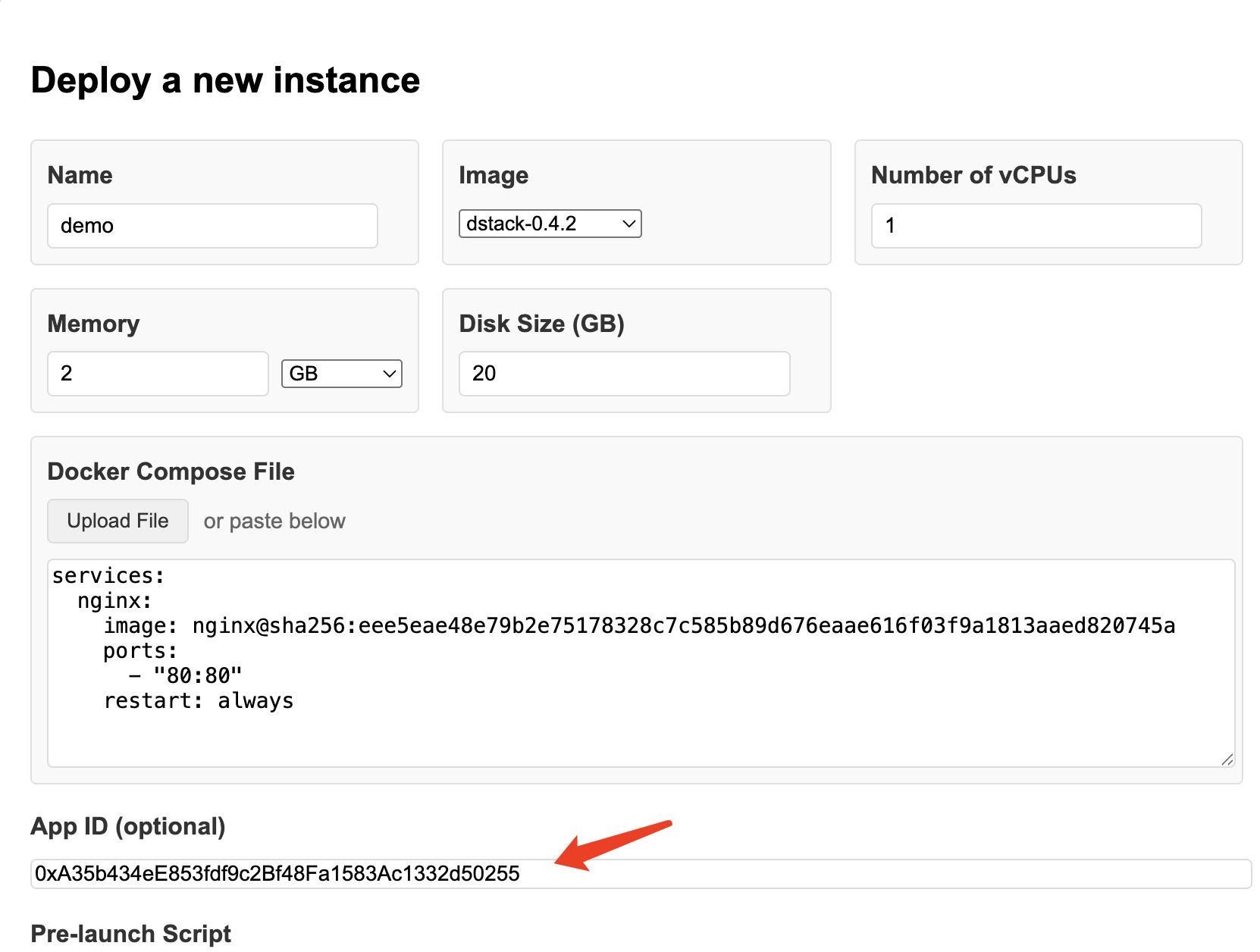
  ### 3. Deploy Instances using dstack-vmm

  <div className="flex flex-col lg:flex-row gap-6 mt-6">
    <div className="flex-1">
      <h4 className="font-medium mb-4">Deployment Configuration</h4>

      <ul className="space-y-2 text-sm">
        <li className="flex items-center">
          <span className="w-2 h-2 bg-blue-500 rounded-full mr-2" />

          Select image <code className="bg-gray-200 px-1 rounded">dstack-0.4.2</code>
        </li>

        <li className="flex items-center">
          <span className="w-2 h-2 bg-blue-500 rounded-full mr-2" />

          Fill in the AppId from contract deployment
        </li>

        <li className="flex items-center">
          <span className="w-2 h-2 bg-yellow-500 rounded-full mr-2" />

          Memory requirement: <code className="bg-gray-200 px-1 rounded">≥ 3G</code> or exactly <code className="bg-gray-200 px-1 rounded">= 2G</code>
        </li>
      </ul>
    </div>

    <div className="flex-1">
      <div className="flex justify-center">
        <img src="https://mintcdn.com/phalanetwork/3Ae8rJnmVcGqGijP/docs/assets/app-deploy.png?fit=max&auto=format&n=3Ae8rJnmVcGqGijP&q=85&s=ecaf81663aa5a3027590b8e2065913a3" alt="App Deployment Interface" className="rounded-lg shadow-md max-w-full h-auto" style={{ maxWidth: '400px' }} width="1662" height="1256" data-path="docs/assets/app-deploy.png" />
      </div>
    </div>
  </div>

  <div className="mt-6 pt-6 border-t border-gray-200">
    <div className="flex flex-col lg:flex-row gap-6">
      <div className="flex-1">
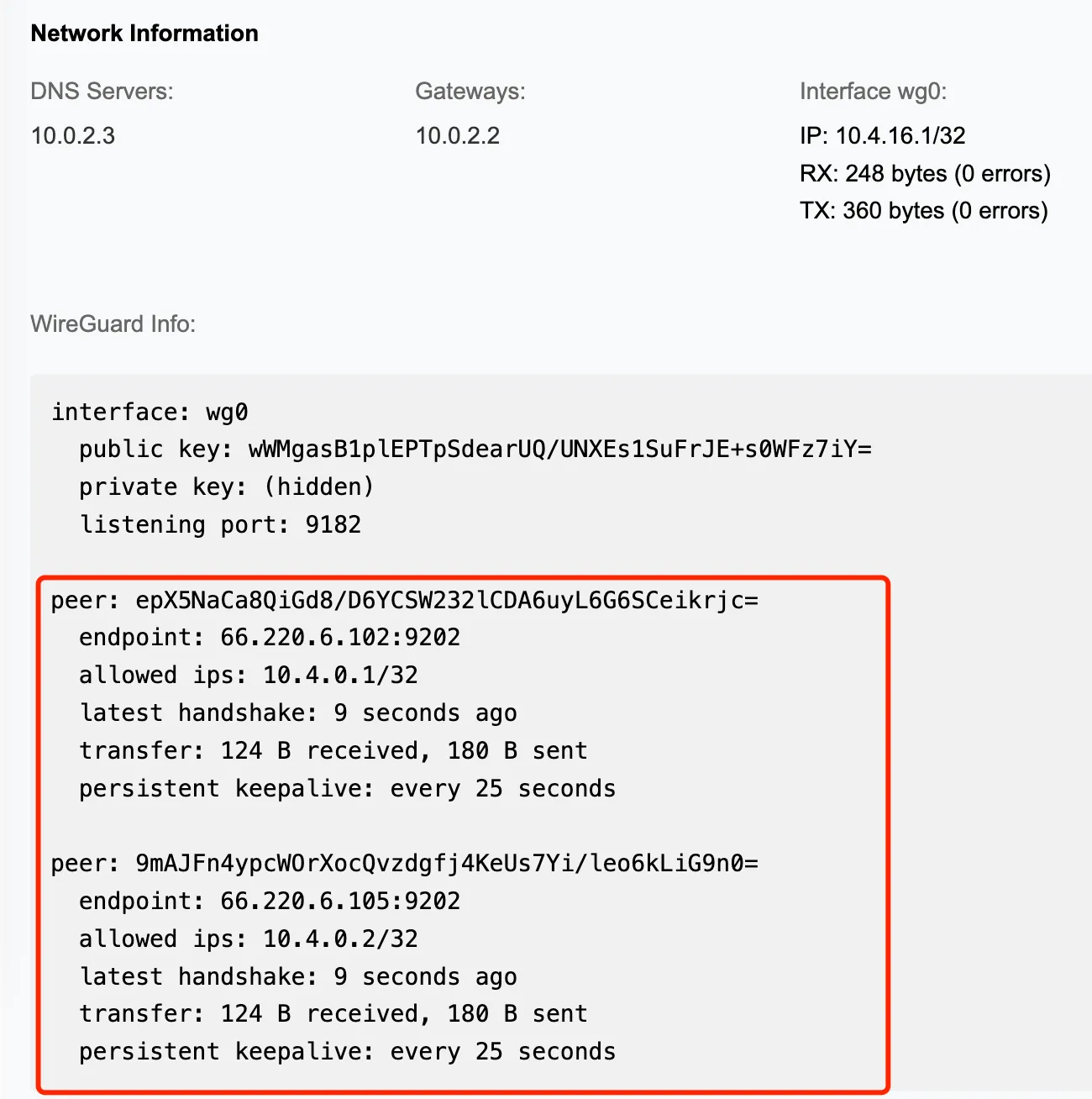
        <h4 className="font-medium mb-4">Access Your Application</h4>

        <p className="text-gray-600 mb-4">
          After the app starts normally, click <strong>\[Board]</strong> to access. You can find the connections to dstack-gateway nodes, meaning that the app is now reachable from the internet.
        </p>
      </div>

      <div className="flex-1">
        <div className="flex justify-center">
          <img src="https://mintcdn.com/phalanetwork/3Ae8rJnmVcGqGijP/docs/assets/app-board.png?fit=max&auto=format&n=3Ae8rJnmVcGqGijP&q=85&s=0bf82d6b0a96022ed47c0e8792fea2b5" alt="Application Dashboard" className="rounded-lg shadow-md max-w-full h-auto" style={{ maxWidth: '400px' }} width="1300" height="1308" data-path="docs/assets/app-board.png" />
        </div>
      </div>
    </div>
  </div>
</div>

<div className="bg-green-50 border border-green-200 rounded-lg p-6 my-8">
  <div className="flex items-center mb-4">
    <svg className="w-6 h-6 text-green-600 mr-2" fill="none" stroke="currentColor" viewBox="0 0 24 24">
      <path strokeLinecap="round" strokeLinejoin="round" strokeWidth={2} d="M9 12l2 2 4-4m6 2a9 9 0 11-18 0 9 9 0 0118 0z" />
    </svg>

    <h3 className="text-lg font-semibold text-green-800">Deployment Complete!</h3>
  </div>

  <p className="text-green-700">
    You have successfully deployed a complete dstack infrastructure with KMS, Gateway, and VMM components. Your applications are now running in secure Trusted Execution Environments and accessible through the internet.
  </p>
</div>